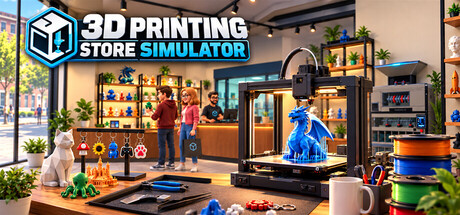
Build and manage your own 3D printing store. Print products, manage filament and inventory, create multicolor prints, assemble finished items, set prices, serve customers, recycle waste, and expand your workshop with better equipment.
Numero di giocatori e Steam charts di 3D Printing Store Simulator
in tempo reale
Numero di giocatori—— in 24 h
Picco di giocatori 24 h0Rilevazione più alta di oggi
Picco di giocatori 30 gg0Media —
Picco storico di giocatori0Dall'inizio delle rilevazioni
Ore di gioco 30 gg—Stima
Steam chart · giocatori 30 ggin attesa di rilevazioni
Raccolta rilevazioni giornaliere in corsoPer questo gioco non ci sono ancora rilevazioni giornaliere. La curva comparirà non appena saranno disponibili i primi giorni di dati.
24 ore—7 giorni—TendenzaStabile
Recensioni0 recensioni
—No user reviews
0 positive0 negative
Raccomandazioni—Punteggio0/9
Ultimi 30 giorninessun datoQuota negativa—Pos. per neg.—
Build Your Own 3D Printing Business
Turn an empty shop into a growing 3D printing business in 3D Printing Store Simulator.
Choose what to print, manage your filament, organize your shelves, set your prices, and keep your store stocked as customers arrive looking for the right products. Start small and gradually expand your production capabilities with better equipment and more advanced products.
Print Your Products
Your products don't simply appear in stock — you make them.
Load filament into your 3D printers, choose a model, select the quantity, and start printing. Different products require different amounts of filament depending on their size and geometry, so every print has a real material cost.
Produce a growing range of products in different sizes, from small decorative items to large, high-value prints.
Master Multicolor Printing
Advanced printers support multicolor production using multiple filament spools.
Some products require two, three, or even four different colors. Make sure the correct filament colors are loaded and that each spool has enough material before starting the job.
Every color used in a print consumes filament individually, making filament selection and stock management an important part of your production process.
Assemble Finished Products
Not every product is ready to sell when it leaves the printer.
Print keychains, move them to your assembly workbench, add the required hardware, and finish them using your tools. Once assembled, organize the finished products on dedicated display stands and prepare them for sale.
Printing is only the beginning of the production process.
Manage Your Store
Decide how your store operates.
Arrange shelves and equipment, organize products, manage inventory, and set your own selling prices. Keep an eye on production costs and make sure popular products stay in stock.
Customers have different product preferences, color preferences, and budgets, so a well-stocked and varied store gives you more opportunities to make a sale.
Complete Special Orders
Some customers want something specific.
Take on special orders, produce the requested item, and prepare it for the customer. Special orders give you another reason to manage production capacity alongside your regular store inventory.
Turn Waste Back Into Material
3D printing creates waste — but it doesn't have to stay waste.
Collect leftover printing material and failed or discarded plastic in your waste system, then process it using recycling equipment. Recover useful material and make waste management part of your production strategy.
Expand Your Workshop
As your business grows, expand your store and workshop with new equipment, production areas, storage, displays, and more advanced 3D printers.
Move from simple single-color production to more capable printing and assembly workflows as your shop becomes a larger 3D printing business.
From Filament to Finished Product
In 3D Printing Store Simulator, you control the entire process:
Order supplies → Load filament → Print → Assemble → Stock → Price → Sell → Recycle → Expand
Build the store your way and turn rolls of filament into a successful business.
Domande frequenti
Al momento Steam non indica un prezzo per 3D Printing Store Simulator.
3D Printing Store Simulator non è ancora uscito. Nessuna data è stata ancora annunciata.
Requisiti minimi: Windows 10 64-bit, Intel Core i5-8400 / AMD Ryzen 5 2600, GTX 1060 6 GB / RX 580 8 GB, 8 GB RAM. La scheda dei requisiti qui sopra mette a confronto i requisiti minimi e consigliati per ogni piattaforma.
Steam indica 5 GB di spazio libero su disco per 3D Printing Store Simulator.
Questo gioco non ha ancora recensioni su Steam.
Sì, 3D Printing Store Simulator ha interfaccia e sottotitoli in italiano, ma non il doppiaggio. In totale Steam elenca 5 lingue, nessuna delle quali con audio completo.
No, Steam classifica 3D Printing Store Simulator come gioco per giocatore singolo.
Le Steam charts di 3D Printing Store Simulator su SteamStatistics mostrano il numero di giocatori in tempo reale e le curve delle ultime 24 ore, 7 giorni e 30 giorni, aggiornate almeno ogni dieci minuti.Apri le Steam charts di 3D Printing Store Simulator ›
Su Steam, 3D Printing Store Simulator funziona su Windows. Nessun supporto per i controller indicato.
Classificazione di 3D Printing Store Simulator: DEJUS L.
Giocatori aggiornati: — · dati del negozio: 10 ott, 07:15 UTC · fonte: SteamWebAPI

 Non ancora uscito