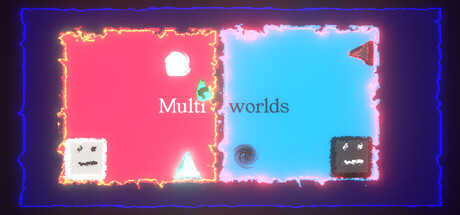
A world torn apart by one mistake, help pull it back into one. A 2D puzzle game where you control multiple player remnants in parallel, jump between dimensions and avoid obstacles to put back the world together.
Coletando amostras diáriasAinda não há amostras diárias salvas para este jogo. A curva aparece assim que os primeiros dias de histórico estiverem disponíveis.
24 horas—7 dias—TendênciaEstável
Análises0 análises
—No user reviews
0 positivas0 negativas
Recomendações
Mídia
9 imagens
Detalhes do jogo
Sobre o jogo
Jogo
Data de lançamento—Data de lançamento não anunciada
Últimos 30 diassem dadosProporção negativa—Pos. por neg.—
Conquistas
—DLC
3706320ID do app
Compatibilidade e recursos
Windows · macOS · LinuxNenhum suporte para controle informado
JogabilidadeSingle-player
Recursos da SteamFamily Sharing
Conforto e áudioMouse Only OptionPlayable without Timed Input
MaisPlayable At Your Own PaceTouch Only Option
Requisitos de sistema
MínimosRecomendadosSistemaWindows 10Windows 11CPUDual-core 2.0 GHzIntel i5 or better (or AMD equivalent)GPUIntel HD 4000 / NVIDIA GeForce 600 series or equivalentNVIDIA GeForce 600 series or equivalentRAM2 GB RAMigualTamanho do download500 MB available space1 GB available space
Sobre Multiworlds
You made one mistake, of touching the untouchable A magical artifact that was buried deep in the depths.
The world tore into multiple worlds, in each timeline, running parallel, but with minor differences. Now strive to fix the world, merging them back into one.
Control the player in multiple worlds, all working parallel. Collect World Pieces of the original world which are scattered around the parallel worlds, and help put back the original world.
Jump into different Dimensions of each world to avoid obstacles blocking your path. Collect the world pieces to protect your original world.
Game Mechanics:
Play multiple player remnants at the same time, in parallel.
Use W/A/S/D or left/right/up/down to queue all player remnants to move together.
Use Q/E to move the player remnants to Light Dimension and Dark Dimension respectively.
Use F to Flip all player remnants to the opposite dimension they're already in.
Set up a move sequence, then simulate.
Collect all the World Pieces to stitch the fragment.
You can interact with items like walls/spikes/collectibles of the same Dimension as a Player Remnant.
Die on interacting with Spikes on the same dimension as the player remnant.
If you're in the Dark Dimension, jump into the Light Dimension, If you're in the Light Dimension, jump into the Dark Dimension. Hit the world edge (wall), and the player stops walking.
You start a level by queuing up actions using the W/A/S/D/Q/E/F buttons, and then hit the Simulate button to simulate the sequence. If you have collected all the World Pieces in the level, you will have stitched the fragment in the timeline, and you move on to the next fragment. Else? Fragment Reset. So strategize well, before you start the simulation. You can stop the simulation manually as well, but you still lose those points ;)
Look out for portals, you can use them strategically to jump through, and your walk continues. You can only use portals that are in the same Dimension as the player.
Which portal connects to which portal? The shape of the portal identifies that.
Use switches in the same Dimension to unlock the locks for certain World Pieces, or Obstacles.
8 Worlds maximum at a time, currently distinguished by colour, can you solve fragments that hard, without dying?
Perguntas frequentes
A Steam não informa um preço para Multiworlds no momento.
Multiworlds ainda não foi lançado. Nenhuma data foi anunciada.
Mínimos: Windows 10, Dual-core 2.0 GHz, Intel HD 4000 / NVIDIA GeForce 600 series or equivalent, 2 GB RAM. O quadro de requisitos acima compara as especificações mínimas e recomendadas para cada plataforma.
A Steam indica 500 MB de espaço livre em disco para Multiworlds. Os requisitos recomendados pedem 1 GB.
Ainda não há análises da Steam para este jogo.
Não — a Steam não lista o português do Brasil entre os idiomas de Multiworlds. No total, a Steam lista 2 idiomas para Multiworlds, nenhum com áudio completo.
Não — a Steam lista Multiworlds como um jogo para um jogador.
Os Steam charts de Multiworlds no SteamStatistics mostram os jogadores ao vivo e as curvas de 24 horas, 7 dias e 30 dias, atualizadas pelo menos a cada dez minutos.
Na Steam, Multiworlds roda em Windows, macOS e Linux. Nenhum suporte para controle informado.
Multiworlds tem classificação DEJUS L e IGRS 3.
Multiworlds: preço, data de lançamento, gráficos e estatísticas

 Não lançado