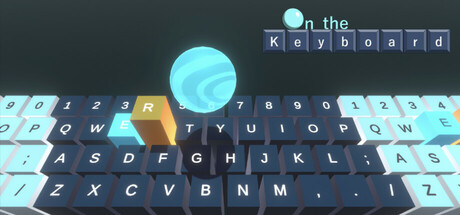
Keyboard action game where you control a virtual keyboard to carry a Sphere.
Jugadores de On the Keyboard y Steam charts
en vivo
Jugadores0— en 24 h
Pico 24 h0Muestra más alta de hoy
Pico 30 días0Prom. —
Pico histórico0Desde el inicio del seguimiento
Horas jugadas 30 días—Estimado
Steam chart · jugadores 30 díasesperando muestras
Recopilando muestras diariasTodavía no hay muestras diarias guardadas para este juego. La curva aparecerá cuando lleguen los primeros días de historial.
24 horas—7 días—TendenciaEstable
Reseñas18 reseñas
72,2%Mostly Positive
13 positivas5 negativas
Recomendaciones—
Multimedia
5 imágenes
Detalles del juego
Acerca del juego
Juego
Fecha de lanzamiento12 de septiembre de 2024En Steam desde hace 2 años
Precio actual$4.99Sin descuento ahora mismoMínimo registrado$4.99desde el 22 sept 2026Último cambio$4.9922 sept 2026Descuentos registrados0desde el 22 sept 2026
Compatibilidad y características
WindowsNo se indica compatibilidad con mando
JugabilidadSingle-player
Funciones de SteamFamily Sharing
Requisitos del sistema
MínimoRecomendadoSistemaWindows10—CPUIntel Core i5—RAM8 GB RAM—Tamaño de descarga200 MB available space—
Acerca de On the Keyboard
Game Summary
This is a keyboard action game where you control a virtual keyboard to carry a Sphere.
The controls are simple: just follow your intuition and press the keys. The virtual keys that correspond to the ones you press will move, and the Sphere will move in response to the force from the keys. Your goal is to carry the Sphere to the finish line without letting it fall off the keyboard.
However, you can't move the Sphere directly, so it often won't behave as you'd like. To manage this irregular Sphere behavior, you’ll need to quickly identify and press the right key from the 40 available. This makes the game more action-packed than it may initially seem.
Moreover, even though it's challenging enough to move the Sphere as intended, the path to the goal is filled with various obstacles that block your way. Overcoming these obstacles requires flexible thinking and skillful manipulation of the keyboard.
Additionally, this game also functions as a typing game, as understanding the spatial arrangement of the keys is crucial. It can improve typing accuracy for both beginners and experienced typists. Why not sharpen your typing skills while having fun with an action-packed game?
And be careful not to break your keyboard!
Supported keyboards
QWERTY
Streaming Guidelines
You are free to stream, record gameplay, or post videos of this game, regardless of whether you are an individual or a company.
It would be appreciated if you could include the game title "On the Keyboard" in the video or stream title, and add the URL of the game's Steam store page in the description.
Please be aware that the game includes a system that retrieves the Steam profile name, so please take care when streaming.
Preguntas frecuentes
On the Keyboard cuesta $4.99 en la tienda de Steam (US). El precio más bajo que hemos registrado desde el 22 sept 2026 es $4.99. Steam fija un precio distinto para el juego en 14 regiones — los precios regionales aparecen más arriba.
On the Keyboard se lanzó el 12 de septiembre de 2024 de la mano de SBO Games. En Steam desde hace 2 años.
Mínimo: Windows10, Intel Core i5, 8 GB RAM. La tarjeta de requisitos de arriba compara los requisitos mínimos y recomendados de cada plataforma.
Steam indica 200 MB de espacio libre en disco para On the Keyboard.
El 72,2% de las 18 reseñas de Steam son positivas — Steam las califica como “Mostly Positive”.
No — Steam no incluye el español entre los idiomas de On the Keyboard. En total, Steam indica 2 idiomas para On the Keyboard, ninguno de ellos con voces.
No — Steam clasifica On the Keyboard como un juego para un jugador.
Los Steam charts de On the Keyboard en SteamStatistics muestran los jugadores en vivo y las curvas de 24 horas, 7 días y 30 días, actualizadas al menos cada diez minutos.
En Steam, On the Keyboard funciona en Windows. No se indica compatibilidad con mando.
On the Keyboard tiene la clasificación DEJUS L e IGRS 3.

 Puesto #94313