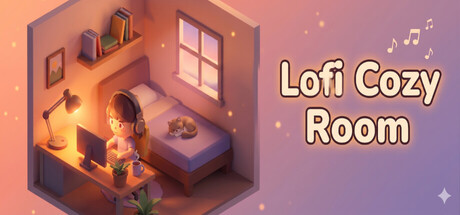
A living 3D desktop companion for your workspace. Pin a cozy Lo-Fi room over your code, browser, or anywhere on your desktop. Customize your room and avatar, enjoy relaxing music, and let your little companion read, work, and sleep while you do your thing.
Jugadores de Lofi Cozy Room y Steam charts
en vivo
Jugadores0— en 24 h
Pico 24 h3Muestra más alta de hoy
Pico 30 días3Prom. 3
Pico histórico3Desde el inicio del seguimiento
Horas jugadas 30 días21Estimado
Steam chart · jugadores 30 díasesperando muestras
Recopilando muestras diariasPor ahora solo hay un día de historial — la curva necesita al menos dos muestras.
24 horas—7 días—TendenciaEstable
Reseñas9 reseñas
100,0%9 user reviews
9 positivas0 negativas
Recomendaciones—Puntuación0/9
Últimos 30 díassin datosProporción negativa0,0%Pos. por neg.—
Multimedia
27 imágenes
Detalles del juego
Acerca del juego
Juego
Fecha de lanzamiento31 de julio de 2026Lanzado hace 2 meses
Lofi Cozy Room puts a tiny living room on your desktop and runs gentle Lo-Fi underneath it while you work.
An avatar and a dog moving around inside a transparent window, furniture that reacts when you click it, and 180 Lo-Fi tracks to make the hours you spend working a little kinder.0. Mini Mode and Work Tools, Right on Your Desktop
Not a screensaver. Not a wallpaper.
A living mini-room sits quietly in the corner of your desktop, inside a transparent window with no frame around it.
If the full window takes up too much room, switch to Mini Mode.
Drag it wherever you need it: over your code, over your browser, anywhere on screen.
Notes, a to-do list, a diary, a Pomodoro timer and a music panel are all built in.
Every tool window moves with the mouse, and you can keep several open at once.
Dual monitors are supported, so windows and panels travel freely from one screen to the other.1. A Cozy Mini-Room of Your Own
Decorate the mini-room you've been picturing.
Rooms, furniture and little props for every mood you can think of.
A room you've arranged yourself makes the hours pass calmer and warmer.
2. Gentle Lo-Fi and Soft Ambient Sound
Fill your mini-room with Lo-Fi tracks and quiet ambient sound.
Somewhere along the way your head goes quiet, and you look up already deep in your work.
And it's not just the built-in tracks — register music files from your own computer as local music and play them right alongside.
Every track in the game is royalty-free.
Play them on stream or in a YouTube video without a single copyright worry.
3. A Mini-Room With Something Going On
The mini-room isn't just there to be looked at.
Click the furniture around the room — each piece has its own small reaction.
Your avatar isn't stuck in a single animation loop either.
Reading on the sofa, working at the desk, resting in the armchair, and off to bed once night falls.4. Your Avatar and Your Dog
Build the character you want to look at all day.
Face, hair and outfit are all yours to set, and you can save as many avatars as you like.
Or just pick one of the ready-made characters and pets and let them keep you company.
A little dog wanders the room on its own and curls up for a nap wherever the sun lands.
5. At a Glance
- Keep a transparent mini-room floating in the corner of your desktop.
- Move between 14 mini-rooms with a single click.
- Show or hide furniture piece by piece to build the mood you want.
- Click around the room to turn up hidden reactions.
- Follow your avatar through a whole day of reading, working and sleeping.
- Share the room with a dog that goes wherever it pleases.
- Customize face, hair and outfit to build an avatar of your own.
- Or pick a favourite from the ready-made characters and pets.
- Listen to 180 hand-picked Lo-Fi tracks.
- Layer ambient sounds until the atmosphere is exactly right.
- Shuffle, repeat and mute straight from the mini music player.
- Amber builds up just from leaving the room open, unlocking new rooms and items one at a time.
- Keep the day in order with notes, a to-do list and a Pomodoro timer.
- Tuck the whole thing into a corner of the screen with Mini Mode.
- Switch UI themes so it sits well with the rest of your desktop.
- No timers pushing you. No in-app purchases.
Jugadores actualizados 19 sept, 09:24 UTC · datos de la tienda 22 sept, 21:41 UTC · fuente: SteamWebAPI
Lofi Cozy Room cuesta $4.99 en la tienda de Steam (US). El precio más bajo que hemos registrado desde el 22 sept 2026 es $4.99. Steam fija un precio distinto para el juego en 14 regiones — los precios regionales aparecen más arriba.
Lofi Cozy Room se lanzó el 31 de julio de 2026 de la mano de Bloomery. Lanzado hace 2 meses.
Mínimo: Windows 10 64-bit, Intel Core i3-4150 / AMD FX-6300, NVIDIA GeForce GTX 750 / AMD Radeon R7 260X, 4 GB RAM. La tarjeta de requisitos de arriba compara los requisitos mínimos y recomendados de cada plataforma.
Steam indica 2 GB de espacio libre en disco para Lofi Cozy Room.
El 100,0% de las 9 reseñas de Steam son positivas — Steam las califica como “9 user reviews”.
Sí — Lofi Cozy Room tiene la interfaz y los subtítulos en español, pero no voces en español. En total, Steam indica 103 idiomas para Lofi Cozy Room, ninguno de ellos con voces.
No — Steam clasifica Lofi Cozy Room como un juego para un jugador.
Los Steam charts de Lofi Cozy Room en SteamStatistics muestran los jugadores en vivo y las curvas de 24 horas, 7 días y 30 días, actualizadas al menos cada diez minutos.Abrir los Steam charts de Lofi Cozy Room ›
En Steam, Lofi Cozy Room funciona en Windows. No se indica compatibilidad con mando.
Lofi Cozy Room tiene la clasificación DEJUS L e IGRS 3.

 Puesto #125153