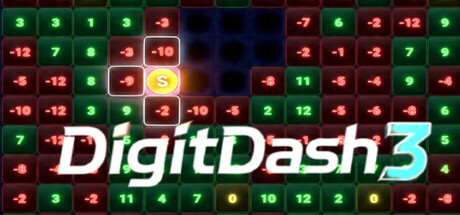
Digit Dash 3 is a live Twitch and Kick chat party game where up to 7 viewers compete for the highest score on a shared game board. Players join by typing !digit in chat and take turns moving a single game piece across a 13×13 grid of numbered cells.
DigitDash3 上線人數與 Steam 圖表
即時
玩家人數024 小時 —
24 小時峰值玩家0今日最高樣本
30 天峰值玩家0平均 —
歷史峰值玩家0自開始追蹤以來
30 天遊玩時數—估計值
Steam 圖表 · 30 天玩家人數等待取樣中
正在收集每日樣本此遊戲尚未儲存任何每日樣本。累積最初幾天的歷史資料後,曲線就會出現。
24 小時—7 天—趨勢持平
評論0 篇評論
—No user reviews
0 篇好評0 篇負評
推薦數—
媒體
5 張圖片
遊戲資訊
關於此遊戲
遊戲
發行日期2026年7月17日2 個月前發行
開發人員SleepNotIncluded發行商SleepNotIncluded類型策略獨立
—成就—DLC4889520
關於此遊戲
玩家數更新於 9月19日 上午05:47 UTC · 商店資料更新於 9月22日 下午08:15 UTC · 來源:SteamWebAPI
最低配備建議配備作業系統Requires a 64-bit processor and operating system OS: Windows 10相同顯示卡IGP相同記憶體1 GB RAM4 GB RAM儲存空間1 GB available space相同
關於 DigitDash3
🎮 Digit Dash 3
Digit Dash 3 is a live party game streamed directly from a streamer's Twitch or Kick channel. Viewers play together in real time by typing simple commands in chat.
🌌 The Board
The game is played on a 13×13 grid of numbered cells. Each cell holds a random value between -12 and +12 at the start of every game. There is one shared game piece that all players take turns controlling — the piece starts in the centre of the board when the game begins.
👥 Players & Joining
- The host (streamer) connects their Twitch or Kick channel from the game's control panel and clicks Start Game once enough players have joined.
- Up to 7 players can join a single game.
- To join, viewers simply type !digit in the streamer's chat.
- Players are added on a first-come, first-served basis. Once the game starts or the lobby is full, no new players can join.
🎯 Taking Turns
Players take turns in order, one at a time. On your turn, you have 35 seconds to move the shared game piece to an adjacent cell — up, down, left, or right. You type your move in chat:
Command Direction W or WW Up S or SS Down A or AA Left D or DD Right
The double-letter variants ( WW , SS , etc.) exist to help avoid Twitch/Kick chat duplicate message filters — both do the same thing.
When a player moves onto a cell, they earn (or lose) the points shown on that cell. Positive numbers add to your score, negative numbers subtract from it.
💥 Cell Destruction — No Regeneration
Cells are permanently destroyed once the game piece passes through them. Both the cell the piece moves from and the cell it moves to are destroyed after every move. There is no regeneration — once a cell is gone, it's gone for the rest of the game. Destroyed cells appear as dark void craters on the board and cannot be moved to.
🌀 Teleportation
If the game piece becomes completely surrounded by destroyed cells with no valid move available, it automatically teleports to a random surviving cell anywhere on the board. The current player instantly claims and destroys that landing cell, earning or losing its points in the process.
🔀 Random Board Shuffle
At random intervals during the game ( between 100 and 200 seconds ), all surviving (non-destroyed) cells have their numbers re-randomised . This can dramatically change the value of cells you were planning to move to — keeping every player on their toes. A "Board Shuffled!" alert flashes on screen when this happens.
⏱️ Inactivity & Removal
If a player fails to make a move within their 35-second window, the game automatically makes a random move on their behalf and counts it as a missed turn . After 3 consecutive missed turns , that player is removed from the game entirely.
A 10-second audio warning plays to remind the current player their time is running out.
🏁 Game Over
The game ends when every cell on the board has been destroyed . The player with the highest score wins . Final scores are displayed on screen with the winner announced.
🤖 AFK / Auto-Run Mode
The host can enable AFK Mode — designed for streams where the host isn't actively present. In this mode:
- The game waits up to 2 minutes for at least 2 players to join, then starts automatically.
- After a game ends, a 30-second countdown begins and then a new game starts automatically.
- This keeps the game running on loop for the stream with no manual intervention needed.
🛠️ Host Controls
The streamer's host screen includes:
- Connect to Twitch or Kick chat
- Start / New Game buttons
- Music volume control
- Activate Cell Zoom — zooms into the game board centred on the current player's position, like a magnifying glass
- Remove individual players manually
- Windowed / Fullscreen toggle

 排名 #128102