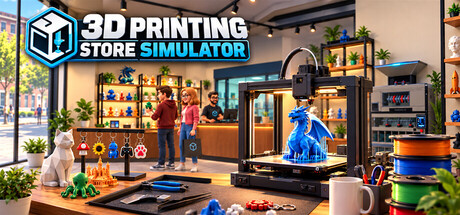
Build and manage your own 3D printing store. Print products, manage filament and inventory, create multicolor prints, assemble finished items, set prices, serve customers, recycle waste, and expand your workshop with better equipment.
3D Printing Store Simulator oyuncu sayısı ve Steam grafikleri
canlı
Oyuncu sayısı
—
24 saatte —
24 saatlik zirve0Bugünkü en yüksek ölçüm
30 günlük zirve0Ort. —
Tüm zamanların zirvesi0Takip başladığından beri
30 günde oynanan saat—Tahmini
Steam grafiği · 30 günlük oyuncu sayısıölçüm bekleniyor
Günlük ölçümler toplanıyorBu oyun için henüz günlük ölçüm kaydedilmedi. Geçmişin ilk günleri girdiğinde eğri görünecek.
24 saat—7 gün—EğilimSabit
İncelemeler0 inceleme
—No user reviews
0 olumlu0 olumsuz
Tavsiyeler—Puan0/9
Son 30 günveri yokOlumsuz oranı—Olumsuz başına olumlu—
Build Your Own 3D Printing Business
Turn an empty shop into a growing 3D printing business in 3D Printing Store Simulator.
Choose what to print, manage your filament, organize your shelves, set your prices, and keep your store stocked as customers arrive looking for the right products. Start small and gradually expand your production capabilities with better equipment and more advanced products.
Print Your Products
Your products don't simply appear in stock — you make them.
Load filament into your 3D printers, choose a model, select the quantity, and start printing. Different products require different amounts of filament depending on their size and geometry, so every print has a real material cost.
Produce a growing range of products in different sizes, from small decorative items to large, high-value prints.
Master Multicolor Printing
Advanced printers support multicolor production using multiple filament spools.
Some products require two, three, or even four different colors. Make sure the correct filament colors are loaded and that each spool has enough material before starting the job.
Every color used in a print consumes filament individually, making filament selection and stock management an important part of your production process.
Assemble Finished Products
Not every product is ready to sell when it leaves the printer.
Print keychains, move them to your assembly workbench, add the required hardware, and finish them using your tools. Once assembled, organize the finished products on dedicated display stands and prepare them for sale.
Printing is only the beginning of the production process.
Manage Your Store
Decide how your store operates.
Arrange shelves and equipment, organize products, manage inventory, and set your own selling prices. Keep an eye on production costs and make sure popular products stay in stock.
Customers have different product preferences, color preferences, and budgets, so a well-stocked and varied store gives you more opportunities to make a sale.
Complete Special Orders
Some customers want something specific.
Take on special orders, produce the requested item, and prepare it for the customer. Special orders give you another reason to manage production capacity alongside your regular store inventory.
Turn Waste Back Into Material
3D printing creates waste — but it doesn't have to stay waste.
Collect leftover printing material and failed or discarded plastic in your waste system, then process it using recycling equipment. Recover useful material and make waste management part of your production strategy.
Expand Your Workshop
As your business grows, expand your store and workshop with new equipment, production areas, storage, displays, and more advanced 3D printers.
Move from simple single-color production to more capable printing and assembly workflows as your shop becomes a larger 3D printing business.
From Filament to Finished Product
In 3D Printing Store Simulator, you control the entire process:
Order supplies → Load filament → Print → Assemble → Stock → Price → Sell → Recycle → Expand
Build the store your way and turn rolls of filament into a successful business.
Oyuncu verisi — · mağaza verisi 10 Eki 07:15 UTC · kaynak: SteamWebAPI
Steam şu anda 3D Printing Store Simulator için bir fiyat listelemiyor.
3D Printing Store Simulator henüz çıkmadı. Bir tarih açıklanmadı.
Minimum: Windows 10 64-bit, Intel Core i5-8400 / AMD Ryzen 5 2600, GTX 1060 6 GB / RX 580 8 GB, 8 GB RAM. Yukarıdaki gereksinimler kartı her platform için minimum ve önerilen gereksinimleri karşılaştırır.
Steam, 3D Printing Store Simulator için 5 GB boş disk alanı belirtiyor.
Bu oyun için henüz Steam incelemesi yok.
Evet — 3D Printing Store Simulator Türkçe arayüz ve altyazı sunuyor, ancak Türkçe seslendirme yok. Steam toplamda 5 dil listeliyor, hiçbirinde tam seslendirme yok.
Hayır — Steam, 3D Printing Store Simulator oyununu tek oyunculu olarak listeliyor.
SteamStatistics üzerindeki 3D Printing Store Simulator Steam Charts sayfası anlık oyuncu sayısını ve 24 saatlik, 7 ve 30 günlük eğrileri gösterir; en az on dakikada bir güncellenir.3D Printing Store Simulator Steam Charts sayfasını aç ›
3D Printing Store Simulator, Steam'de Windows üzerinde çalışır. Kontrolcü desteği belirtilmemiş.

 Çıkmadı