ホーム
ランキング
ゲーム
リリースカレンダー
ゲームを検索
⌘K
ゲームを検索
タイトル、ジャンル、開発元で検索できます。
ja
JPY
‹ すべてのゲーム
統計ビュー
順位 #109695
トレーラー
Radial Fusion
アクション · インディー · PatchCode, LLC
¥ 135
Steamで見る
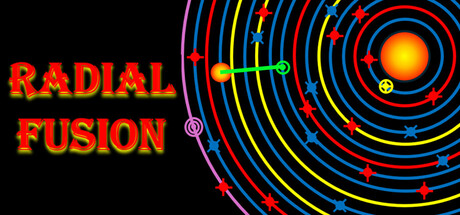
2D retro style orbital space arcade shooter game. In this multilevel game, use your ship's beam and plasma weapon to fend off enemy ships and mines. Prevent the star from exploding and destroying the solar system.
続きを読む
Radial Fusionのプレイヤー数とSteamチャート
ライブ
プレイヤー数
0
24時間で—
24時間ピーク
0
本日の最高サンプル
30日ピーク
0
平均—
歴代ピーク
i
0
追跡開始以来
30日間のプレイ時間
i
—
推定値
Steamチャート · 30日間のプレイヤー数
サンプル待ち
日次サンプルを収集中
このゲームの日次サンプルはまだ保存されていません。最初の数日分の履歴がそろうとグラフが表示されます。
24時間
—
7日間
—
トレンド
横ばい
レビュー
0件のレビュー
—
No user reviews
好評0件
不評0件
おすすめ数
—
メディア
6枚の画像
ゲーム詳細
このゲームについて
DEJUS L
ゲーム
リリース日
2025年7月28日
Steamでの配信開始から1年
開発元
PatchCode, LLC
パブリッシャー
PatchCode, LLC
ジャンル
アクション
インディー
—
実績
—
DLC
3727700
このゲームについて
プレイヤー数更新:9月18日 18:22 UTC · ストアデータ:9月22日 19:53 UTC · ソース:SteamWebAPI
[email protected]
スコア
0/9
過去30日間
データなし
不評の割合
—
好評/不評比
—
App ID
エディションとDLC
Radial Fusion
本編
$0.99
14地域の価格 ›
Steamで開く ↗
価格履歴
すべての価格変動 ›
現在の価格
¥ 135
現在割引なし
記録上の最安値
¥ 135
2026年9月22日以降
最終変動
¥ 135
2026年9月22日
記録された割引回数
0
2026年9月22日以降
互換性と機能
Windows
コントローラー対応の記載なし
1言語 ›
ゲームプレイ
Single-player
Steamの機能
Family Sharing
Steam Cloud
快適性とオーディオ
Keyboard Only Option
全4件の機能を表示 ›
システム要件
最低
推奨
OS
Windows 10 (64 bit)
—
プロセッサー
Ryzen 3 or Intel Core I3
—
グラフィック
Intel HD Graphics 3000
—
メモリー
3 MB RAM
—
ストレージ
41 MB available space
—
すべてのシステム要件 ›
Radial Fusionについて
2D Retro Style Orbital Space Arcade Shooter Game Defend the solar system from total destruction due to uncontrolled Radial Fusion that is triggered by enemy mines and weapons. Game Screen Scaling: The screen size can be scaled by using the and keys. Game Levels 1-6: The game is won by destroying all Descending Enemy Fusion Weapons (Blue). The game is lost when uncontrolled Radial Fusion is triggered by either Stable Orbital Enemy Mines (Red) or Descending Enemy Fusion Weapons (Blue). There are 6 levels of increasing difficulty. The bonus level is enabled after passing level 3. Player initials, high score, total Player Ships damaged and game time are all saved at the end of a level. Bonus Level: Play until the Player Ship is destroyed. Use the Player Ship beam weapons to discharge the Low and High Orbit Enemy ships before they fire their weapon. Firing on a noncharging enemy ship will result in a feedback beam pulse that will reduce your score. The enemy weapons will charge faster and faster over time as the bonus round continues. Player initials, high score, Enemy Low and High Orbit Charge Speed (CSL) and CSH) for the bonus round is saved. Game Level 1-6 Characters: Descending Enemy Fusion Weapons (Blue) - These weapons descend towards the star. - They will detonate if they reach the star and trigger runaway Radial Fusion. - Avoid collisions with the Player Ship or ship damage will occur. - To fire the Player Ship beam weapon consistently, keep the Player Ship radially aligned with the star and each Descending Enemy Fusion Weapon by tapping the Player Ship speed up and slow down
keys and holding or tapping the and keys. Stable Orbital Enemy Mines (Red) - Level 2 and Above - If you stay too long in one orbit the mine will fire an orbital plasma weapon. - Use the Player Ship defense weapon to destroy it or change the Player Ship orbit. - Avoid Player Ship collision, or the mines will all fire lasers into the star and trigger runaway Radial Fusion. Charged Yellow Orbit - Level 3 and Above - If you move to a Yellow Orbit your ship will be damaged but will clear the orbit. - To discharge and clear a Yellow Orbit, fire the Player Ship orbital Beam prior to entering that orbit. Charged Red Orbit - Level 4 and Above - If an orbit changes to Red, and you move to that orbit, your Player Ship beam weapon used to fire on Descending Enemy Fusion Weapons will be disabled. Low Orbit Enemy Ship (Yellow) - Level 5 and Above - Has a laser that will fire on the Player Ship if radially aligned with the Player Ship and star. - Protect Player Ship with its shield
. High Orbit Enemy Ship (Purple) - Level 6 - Has a descending orbital weapon that will head toward the star and damage the Player Ship on contact. - Protect Player Ship with its shield
. Player Ship (Green) - Use the beam weapon to fire on the Descending Enemy Fusion Weapons (Blue), Low Orbit Enemy Ship (Yellow), High Orbit Enemy Ship (Purple). - The Player Ship must be closely radially aligned with the star and the enemy ships for the beam weapon to target and to fire. - Use the and
keys to speed up and slow down respectively. - Tap or hold the and keys to stay aligned with a specific enemy. - Tap the or (Down Arrow> keys to move up or down an orbit respectively. - Firing on a Stable Orbital Enemy Mine (Red) will result in the mine firing back and subtracting points from the game. - The number of new Player Ships is infinite. Press
if Player Ship is completely red and disabled to reactivate the Player Ship. Pressing
will also activate a temporary additional shield at Level 5 and 6 to protect against High and Low Orbit Enemy ships. - If a Player Ship turns blue, the beam weapon needs to be recharged with the key. The must be released while charging the Player Ship. Game Levels 1-6 Player Ship Keyboard Controls/Functions: Bonus Level Characters: Low Orbit Enemy Ship (Blue) - One enemy ship at a time will begin charging its weapon. - Once fully charged it will fire its weapon. Low Orbit Target Beam (Blue) - Use the and arrow keys to move the Player Ship target beam to the current charging enemy ship. - Then fire the proper Player Ship beam weapon for that enemy ship. High Orbit Enemy Ship (Purple) - One enemy ship at a time will begin charging its weapon. - Once fully charged it will fire its weapon. High Orbit Target Beam (Purple) - Use the and arrow keys to move the Player Ship target beam to the current charging enemy ship. - Then fire the proper Player Ship beam weapon for that enemy ship. Player Ship (GREEN) - Use two different targeting beams and two beam weapons to discharge the enemy weapons. Player Ship Keyboard Controls/Functions:
よくある質問
SteamでのRadial Fusionの価格はいくらですか?
Steamストア(JP)でのRadial Fusionの価格は¥ 135です。2026年9月22日以降に当サイトが記録した最安値は¥ 135です。Steamではこのゲームに14地域で個別の価格が設定されています。地域別の価格は上記のとおりです。
Radial Fusionはいつリリースされましたか?
Radial Fusionは2025年7月28日にPatchCode, LLCからリリースされました(Steamでの配信開始から1年)。
Radial Fusionの必要スペック(システム要件)はどれくらいですか?
最低:Windows 10 (64 bit), Ryzen 3 or Intel Core I3, Intel HD Graphics 3000, 3 MB RAM。上のシステム要件カードでは、各プラットフォームの最低スペックと推奨スペックを比較できます。
Radial Fusionに必要なストレージ容量はどれくらいですか?
Steamでは、Radial Fusionに必要な空き容量は41 MBとされています。
Radial Fusionの評判はどうですか?レビューの評価は?
このゲームにはまだSteamレビューがありません。
Radial Fusionは日本語に対応していますか?
いいえ。SteamにはRadial Fusionの日本語対応は記載されていません。Steamには合計1言語が掲載されており、フル音声に対応した言語はありません。
Radial Fusionはマルチプレイや協力プレイに対応していますか?
いいえ。Steamでは、Radial Fusionはシングルプレイヤーゲームとして記載されています。
Radial Fusionのプレイヤー数とSteamチャートはどこで見られますか?
SteamStatisticsのRadial FusionのSteamチャートでは、リアルタイムのプレイヤー数と24時間・7日間・30日間の推移グラフを確認できます。データは少なくとも10分ごとに更新されます。
Radial FusionはMacやLinuxでも遊べますか?
Steamでは、Radial FusionはWindowsに対応しています。コントローラー対応の記載なし。
Radial Fusionの年齢レーティングはどうなっていますか?
Radial Fusionの年齢レーティングはDEJUS L、IGRS 3です。
Radial Fusion:価格・発売日・同時接続数・統計
全10件の質問を表示
質問を折りたたむ
Radial FusionのSteamチャートを開く ›

 順位 #109695